Invisible characters
Invisible characters
Invisible characters are characters you can type or insert, but not see. Bloom supports 22 invisible characters. How to type or insert invisible character is beyond the scope of these Bloom helps.
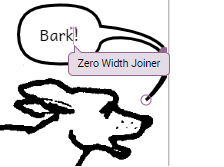
Here is how you can learn where the invisible characters are in your text:
-
Click the text box, overlay or wherever you typed text.
-
On your keyboard, press Ctrl+Shift+Spacebar.
Any invisible characters are identified in temporary tool-tips.
Examples:
- Narrow No-Break Space (U+202F) and Zero Width Space (U+200B).
https://en.wikipedia.org/wiki/Non-breaking_space
https://en.wikipedia.org/wiki/Zero-width_space

- Zero Width Joiner (U+200D)
https://en.wikipedia.org/wiki/Zero-width_joiner